NewTaskhouse 0.3 for Mac

All your coding agents.
One canvas.

Run Claude CodeCodexGemini CLICursoropencode side by side. Every task gets a frame with live terminals, and the agent that needs you lights up.

Download for Mac

Free for one project. Pro is free for a week. macOS 14 or later on Apple Silicon.

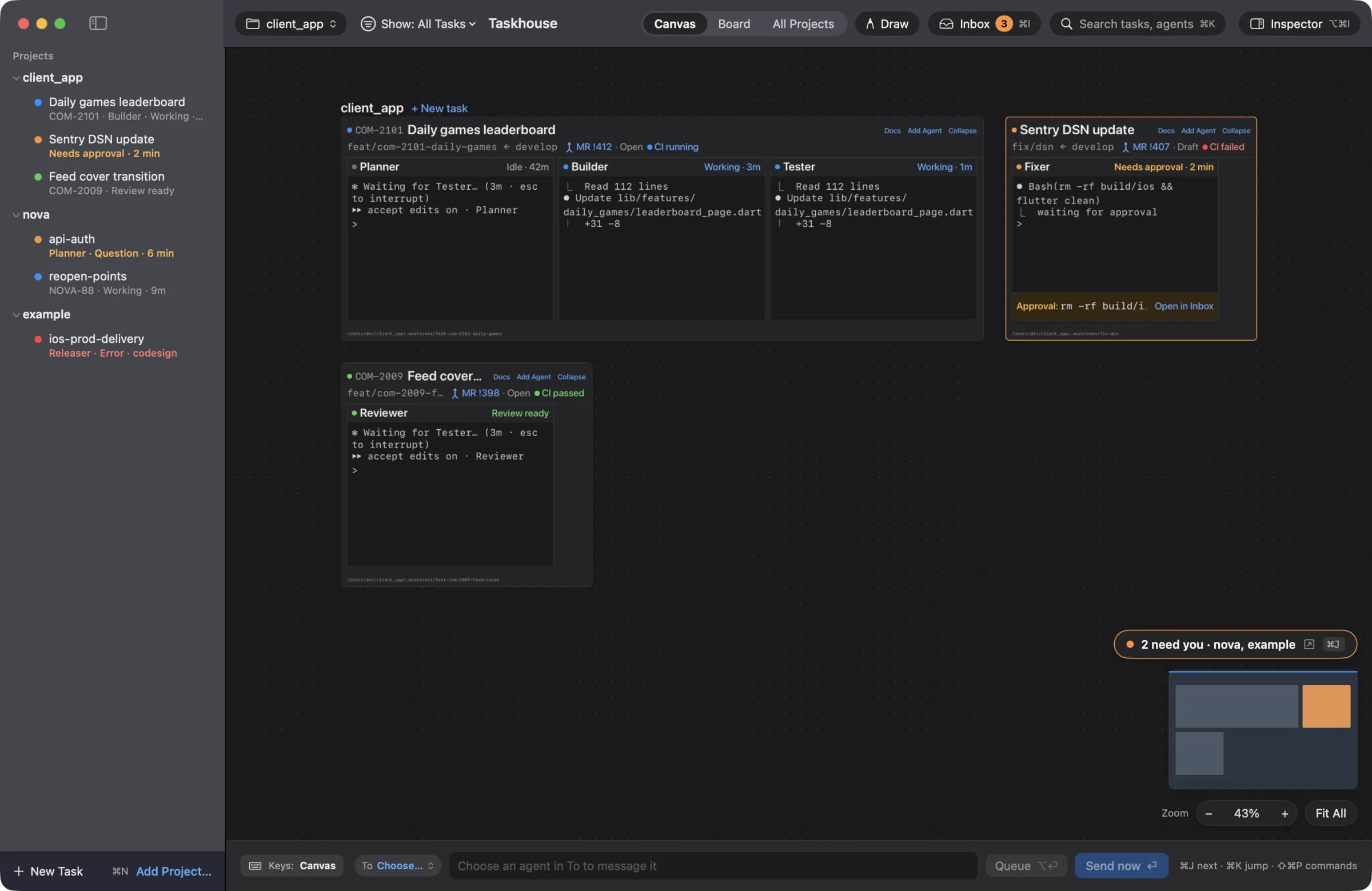
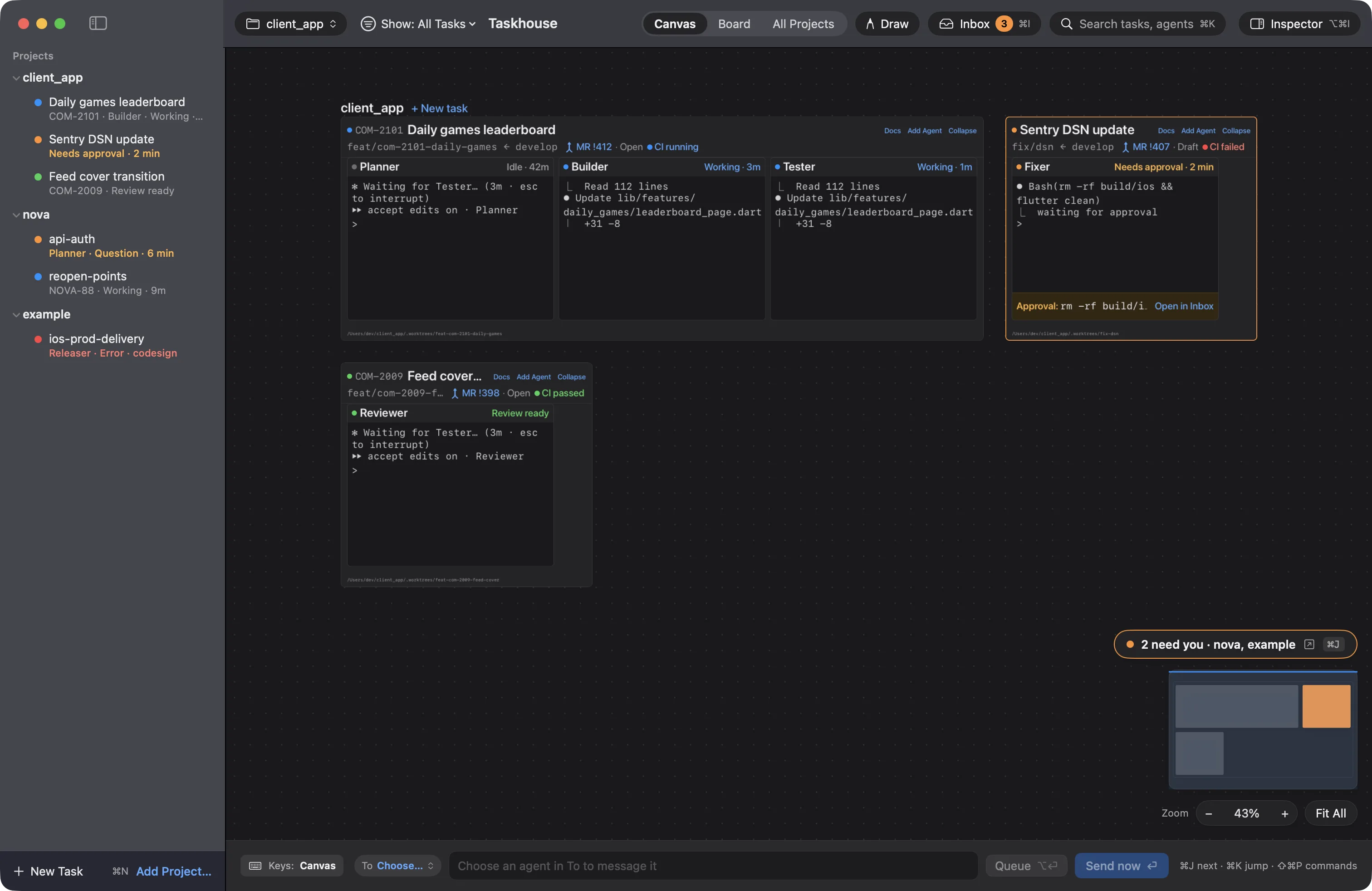
The Taskhouse canvas with three projects. Task frames hold Planner, Builder, Tester and Reviewer agents in live terminals, and one Fixer agent is waiting for approval.

Runs the agent CLIs you already use

  • Claude Code
  • Codex
  • Cursor
  • Gemini CLI
  • Copilot CLI
  • Amp
  • Grok Build
  • Antigravity
  • opencode
  • Your shell

Why a canvas

Eight terminal tabs. Which one is waiting on you?

Drag the line to see the same afternoon in Taskhouse.

The same agents on the Taskhouse canvas, with the one waiting for approval lit up. With Taskhouse

The canvas

Zoom out to see everything. Zoom in to work.

Every project, task and agent lives on one canvas you can pan and zoom like a map.

  1. 01

    Every project, one canvas

    nova, client_app and example sit side by side. Nothing hides in a tab you forgot about.

  2. 02

    Every task is a frame

    A task holds its agents, plan and previews. Zoom in and the terminals are live. Zoom out and they turn into status cards.

  3. 03

    The one that needs you glows

    When an agent is waiting on you, its frame lights up, so you can spot it from across the canvas.

  4. 04

    Jump straight to it

    The pill counts who needs you, and the minimap shows where. Press ⌘J to go to the next one.

The Taskhouse canvas at full size, with the nova, client_app and example projects.

Built for a day of agents

Everything an agent needs from you, in one place.

Taskhouse runs the real CLIs and keeps track of them, so you can stop hunting through terminal tabs.

Inbox

See which agent needs you.

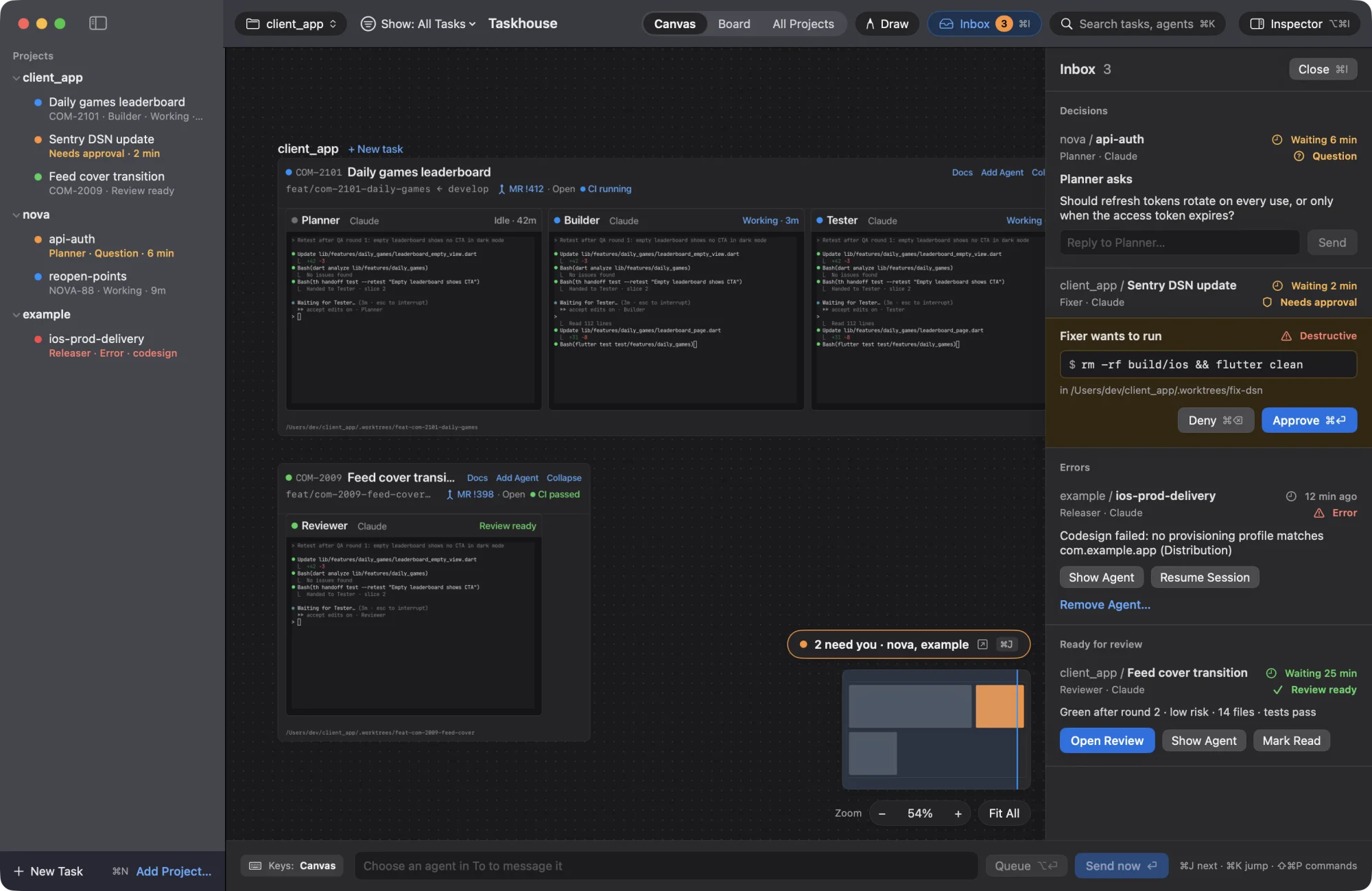
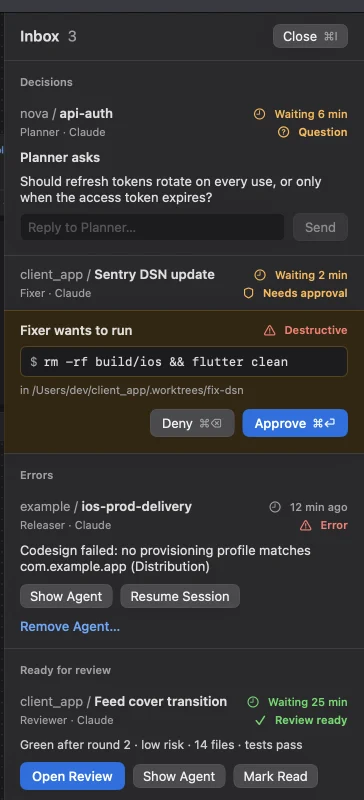
Approvals, questions, errors and finished reviews land in one Inbox. Claude Code's status comes from its own hooks, not from reading the screen.

  • QuestionsPlanner asks how refresh tokens should rotate
  • ApprovalsFixer wants to run a destructive command
  • ErrorsCodesign failed in ios-prod-delivery
  • ReviewsFeed cover transition is ready, 14 files
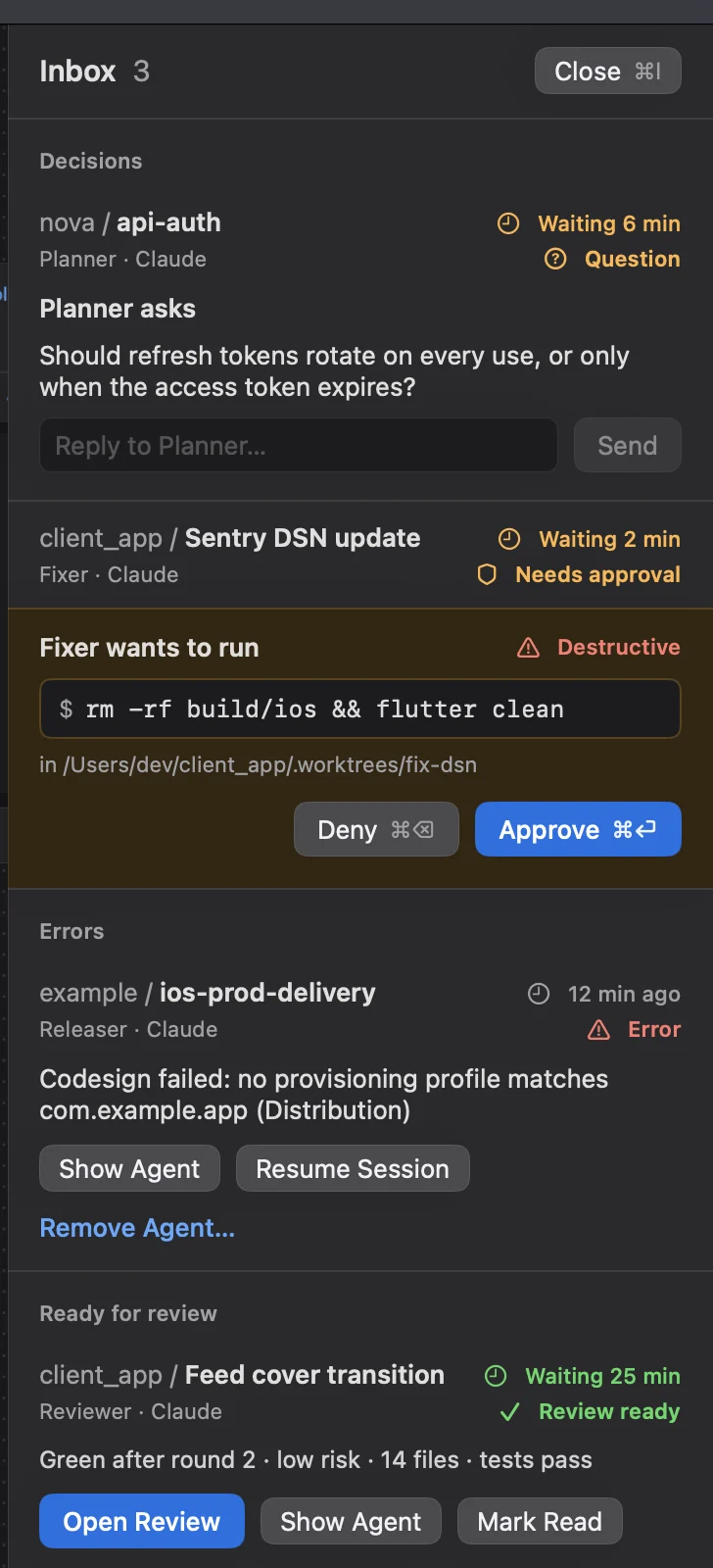
The Inbox with a Planner question, a Fixer asking to run rm -rf, a codesign error and a review that is ready.

Live terminals

The real CLIs, untouched.

Each agent runs in a real terminal with your own config and sign-in.

Built to last

Agents outlive the app.

A small daemon owns every terminal. Quit, update or crash the app, and your agents keep working.

Accounts

Every account, side by side.

Sign in to more than one Claude or Codex account, watch their limits, and pick one per agent.

Automations

Work that runs itself.

Send a prompt, run a command or write a digest, on a schedule or when something happens.

Proposals

Agents suggest. You decide.

An agent can propose a task or an automation. Nothing starts until you approve it.

iPhone

Approve from anywhere.

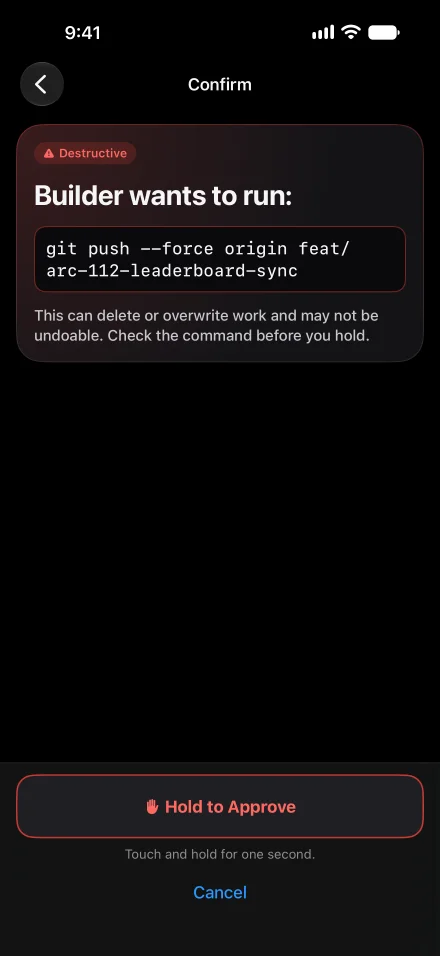
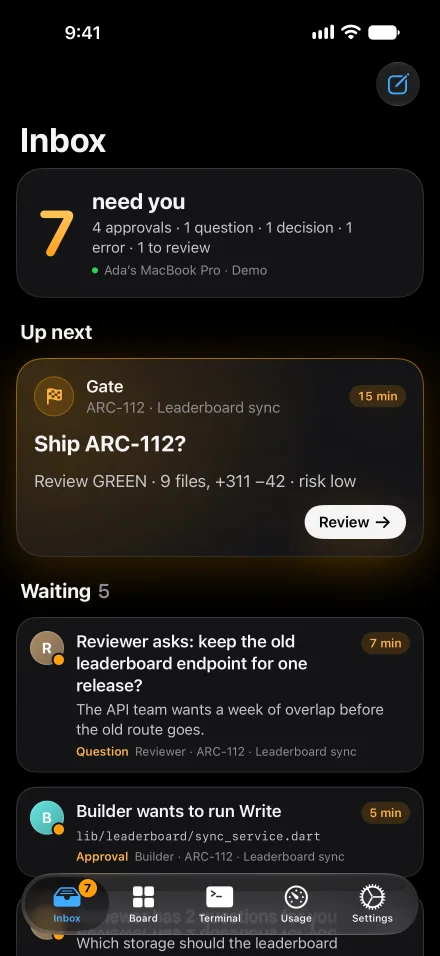
The Inbox comes with you, end-to-end encrypted through Taskhouse's relay. Scan a QR code, allow it on your Mac, and you're paired, with no VPN to set up. Risky commands need a press and hold.

Get Taskhouse Companion on the App Store.

The iPhone app confirming a destructive force push of the arc-112 branch, with a Hold to Approve button.

Runs locally

Your Mac. Your code.

No account to create and no telemetry. Your code and your agents' output never reach a Taskhouse server in a form it can read.

A day with Taskhouse

You run the day. The agents do the typing.

What a working day looks like with five agents across three projects.

  1. The morning status is waiting

    A weekday automation asks each task's lead agent for a three-line status, so you start with a summary instead of scrollback.

    Automation · Weekdays at 09:00
  2. Planner has a question

    Should refresh tokens rotate on every use? You answer from the Inbox without finding its terminal.

    Question · nova / api-auth
  3. Fixer wants to run rm -rf

    You're away from your desk. Your iPhone shows the command, and you press and hold to approve it.

    Needs approval · Destructive
  4. CI fails on a branch

    An automation hands the failure to an agent before you've seen the email.

    Automation · When CI fails
  5. A review is ready

    Reviewer finished the feed cover transition: green after round 2, low risk, 14 files, tests pass.

    Review ready · client_app
  6. You quit the app

    The agents keep working. Tomorrow their scrollback is right where you left it.

    thd · still running

Three ways to look

Focus. Board. Jump.

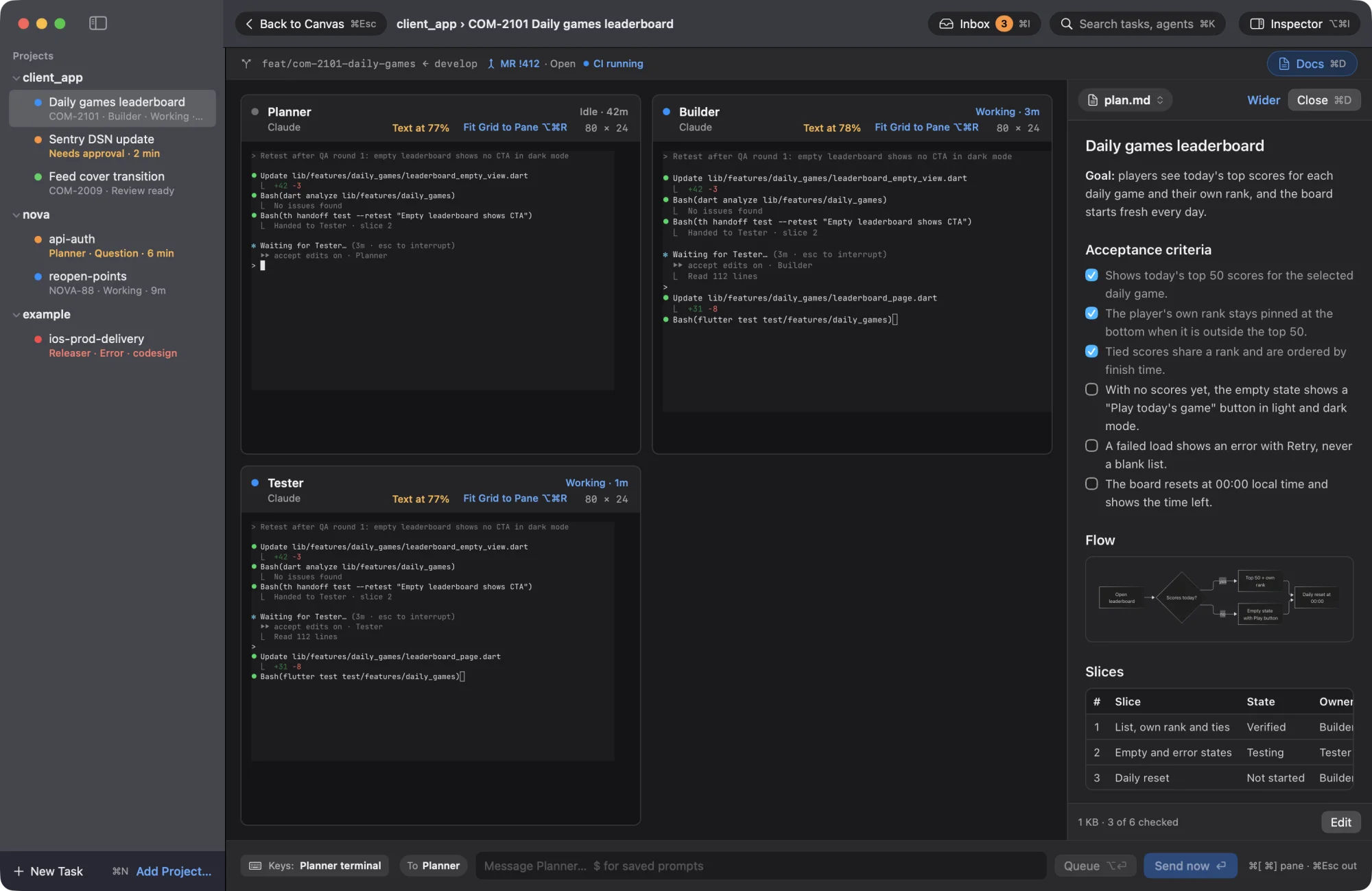
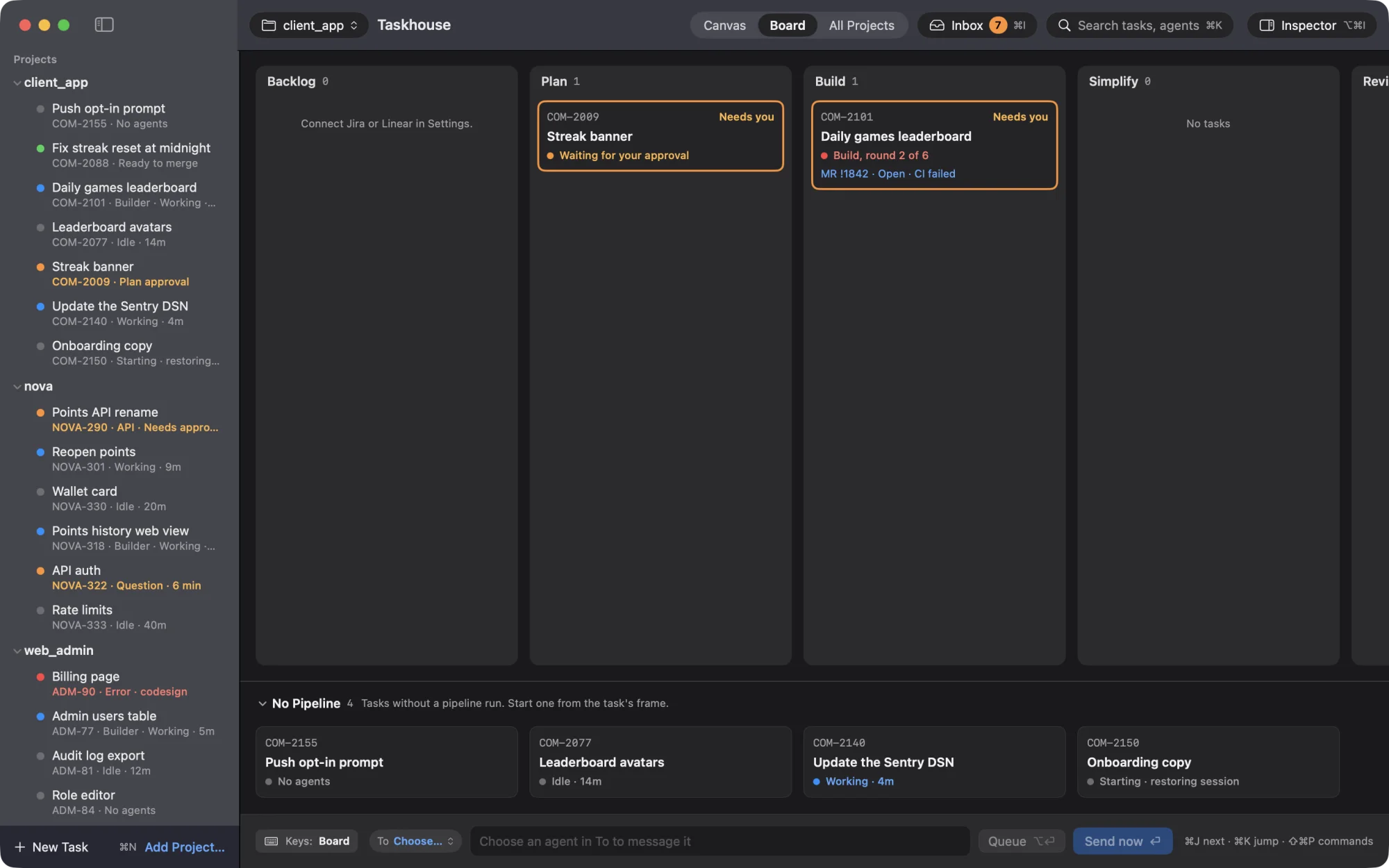
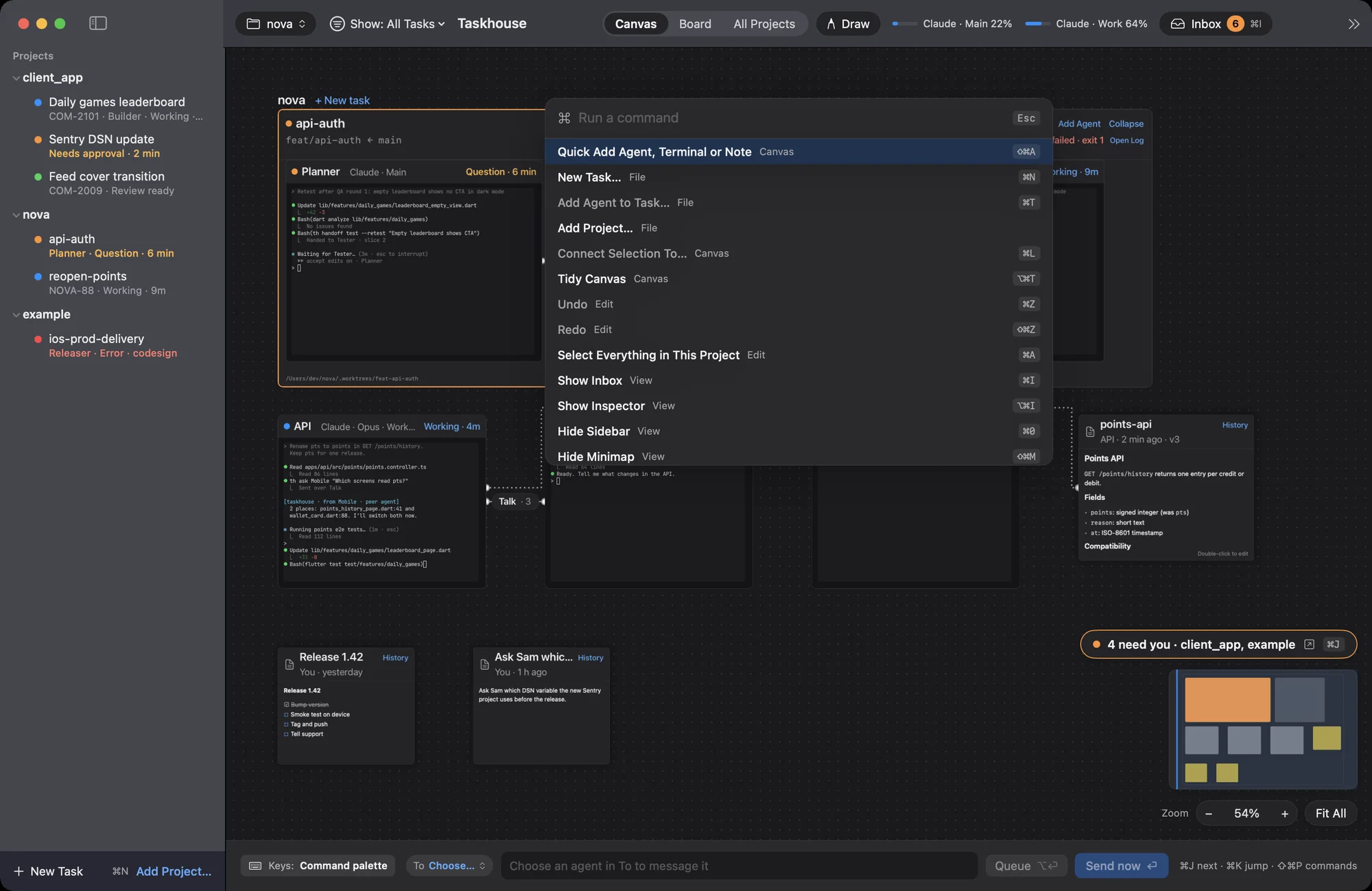
Open one task full-window, see every task by stage, or type your way to any agent.

A task opened full-window: Planner, Builder and Tester terminals, with the task's plan document open on the right.
119.7fps

on a canvas with 30 agents

11.9ms

from key to glyph (p95) with 20 agents streaming

0lost

agents when the daemon was killed with 10 running

Keyboard first

Four keys run the whole canvas.

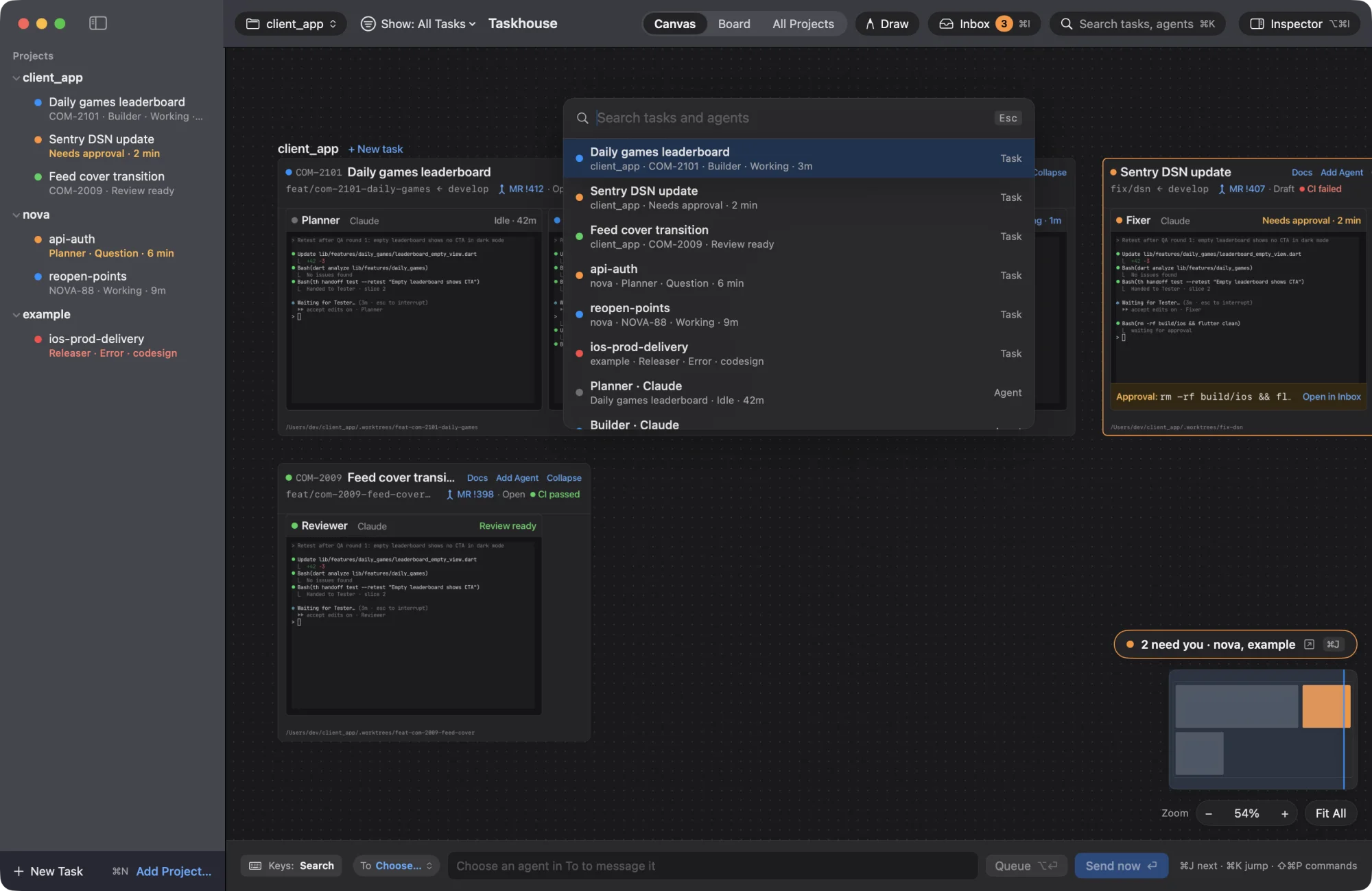
Pick a key, or press K, J, I or P on your keyboard.

Quick Jump open over the canvas, listing tasks and agents with their status.

Pricing

One project free. Every project with Pro.

Free covers one project with every feature. Pro opens up the rest for $8 a month, or $80 a year, and the first week is free.

Free

Everything Taskhouse does, for one project.

$0
foreverno card needed

Download and start running agents.

  • 1 project
  • As many agents as you like in it
  • The canvas, Inbox, Quick Jump and every other feature
Download for Mac
Free for a week 2 months free

Taskhouse PRO

For running every project you have in Taskhouse.

$8
per monthafter your free week
$6.67
per monthbilled $80 a year

7 days free, then $8 a month. Cancel any time.

Save $16 a year compared with monthly. That's under 22 cents a day.

  • Unlimited projects
  • Everything in Free
  • One licence key for up to 3 Macs
  • Cancel or copy your key any time from Polar's customer portal
Start your free week Buy Pro yearly

Secure checkout with Polar. Prices in US dollars.

Every Pro licence includes

3 MacsOne key for up to three Macs you use yourself.
Nothing deletedIf Pro ends, your other projects stay on your Mac, read-only, until you renew.
A free weekMonthly plans start with seven days free.
Cancel any timeFrom Polar's customer portal, linked from your receipt.
Taxes handledPolar is the merchant of record and adds VAT or sales tax where it applies.

What happens after the free week?

Your first payment is taken when the trial ends. Cancel before then and you aren't charged, and you keep Free with your first project.

How do I cancel?

From Polar's customer portal, linked from your receipt. Pro stays on until the end of the period you paid for. Then you're back on Free: one project stays fully yours, and the others stay on your Mac, read-only, until you renew.

What if it isn't for me?

Email narek@zoel.io within 14 days of your first payment and we'll refund it in full.

Where's my licence key?

In your receipt, and in Polar's customer portal, where you can copy it again whenever you need it.

Give your agents a home.

Install the app and it sets up its background daemon for you. Updates install when you quit, and your agents keep running through them.

Download for Mac

Version 0.3.0 · macOS 14 or later · Apple Silicon · What's new

Questions

What data does Taskhouse collect?

None. There's no account and no telemetry. Your agents talk to their own vendors exactly as they would in your terminal.

Two things can leave your Mac because of Taskhouse itself. The update check sends your IP address and the app's version, and you can turn it off. If you use the phone app, it reaches your Mac, and gets its notifications, through a Taskhouse relay that only ever sees them encrypted. You can run your own relay or turn it off and use Tailscale. Read the privacy policy.

What runs on my Mac?

The app, plus a small background daemon called thd that the app installs as a login item. The daemon listens only on 127.0.0.1. Each agent's terminal is owned by its own small holder process, so quitting or updating the app never stops your agents.

Your data lives in ~/Library/Application Support/Taskhouse/, and docs are markdown files in ~/Taskhouse Docs/.

Does it work with Claude Code and Codex?

Yes. Claude Code is the best supported: its status comes from its own hooks, so Taskhouse knows exactly when it's working, waiting for approval or done. Codex runs too, with less detail about what it's doing.

Cursor, Gemini CLI, Copilot CLI, Amp, Grok Build, Antigravity, opencode and a plain shell also run. You need each CLI installed and signed in yourself.

Does it use my Claude or ChatGPT subscription?

Yes. Taskhouse runs the vendors' real CLIs in a terminal, so they stay on your own plan. You can add more than one account per CLI and move work to another account when one hits its limit.

Can an agent approve its own commands?

No. Taskhouse never types "yes" for you, and one agent can't approve another's request. Commands like rm -rf or git push --force are marked destructive and need a second confirmation.

What happens if the app crashes?

Nothing happens to your agents. Reopen the app and their screens and scrollback are where you left them.

Is there an iPhone app?

Yes, a native one: Taskhouse Companion on the App Store. Scan the QR code in Settings, Phone, allow it on your Mac, and it reaches your Mac from anywhere through Taskhouse's relay, encrypted end to end. You don't need a VPN. If both have Tailscale, it also connects directly, which is a little faster.

Does it run on Windows, Linux or Intel Macs?

The app needs an Apple Silicon Mac with macOS 14 or later. While Phone access is on, another computer on your Tailscale network can use Taskhouse in a browser.